A Few Thoughts on NJ Tech Meetup with Lewis Schiff

20130724-232112.jpg
Hoboken’s Finest Meetup

One of my favorite Meetups is the monthly NJ Tech gathering. It’s a great crowd with excellent speakers and there is always a wait list.

Here’s how it works every month.

    Pizza and networking.
    Opening remarks.
    A word from the sponsors.
    A chance for the crowd to give rapid fire pitches or requests.
    Three quick startup presentations with Q&A.
    The guest speaker.
    Vote on the best startup.
    Adjourn for beer.

Repeat that formula every month and you have a pretty killer meetup.
20130724-222804.jpg
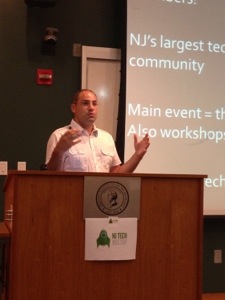
Aaron Price – Master of Ceremonies

Aaron Price is the mastermind who organizes this extravaganza. Every month he lines up both smart startups willing to throw themselves to the lions and high profile special guests. Just a few of the past speakers include Ari Meisel, David Kidder, Scott Belsky, Peter Bell and Bob Dorf.

20130724-222752.jpg
NJ Tech’s Stanley Cup

Tonight, three startups each got five minutes to present and five minutes to answer questions. Yes, the stakes are high. The merciless crowd picks the best pitch and awards them the highly coveted, “recycled and rebranded” trophy.

20130724-222741.jpg
Startup #1 iBE.net

First up tonight was iBE.net. They provide an enterprise cloud software solution for small and medium sized businesses that works across devices.

20130724-222717.jpg
Startup #2 Geekrowd

Then, Geekrowd pitched their “platform as a service.” They are a jSON api for developers who want to build social apps and tools.
20130724-235031.jpg
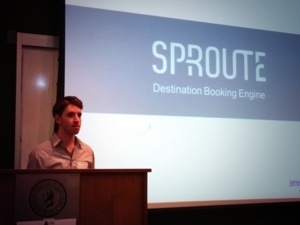
Startup #3 Sproute

The final pitch came from Sproute. They provide a B2B2C white label digital concierge for travelers. Currently, they are working on a new name and prepping for launch.

20130724-222650.jpg
Lewis Schiff on how to be Business Brilliant

The main event was a speech from entrepreneur and writer, Lewis Schiff. His focus tonight was the major points from his recent book, Business Brilliant. Outlining his simple four point LEAP strategy on how Ultra High Net Worth players get wealthy and stay wealthy, Lewis spoke with conviction and drew on hard data to back up his findings.

20130724-222630.jpg
LEAP – Learn, Earn, Assistance, Persistence

1 LEARN Discover the few things you are exceptionally good at that will make you money. Focus almost solely on those skills.

2 EARN Make money doing what you do best. Move up the ladder from being a player to being the proprietor. A job will make you money. A business can make you very rich.

3 ASSISTANCE Develop your network. Know the people who will bring you business and opportunities. Choose wisely and surround yourself with a few truly great people.

4 PERSISTENCE Fail, fail, fail…and learn from failure. Don’t give up and keep going. Stay focused. Have faith in failure.

20130724-222606.jpg
And Sproute wins it all!

Finally, the moment we had all been waiting for. Which startup would bask in the glory of the NJ Tech Meetup’s blessing? The audience voted by phone and the real-time results yielded a winner….Sproute. And the crowd went wild!

This is a can’t-miss meetup. Come join us on August 2nd with Scott Heiferman, founder of Meetup or September 16th with Michele Brown, CEO of the NJ Economic Development Authority. It would be great to see you there.
Fourstalgia vs NYPL Time Traveller

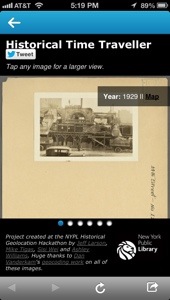
A few weeks ago the New York Public Library launched NYPL Time Traveller, an app that connects to your Foursquare account and surfaces historical pictures when you check in near historical places around New York City. When you check in, Foursquare alerts you that there are historical pictures nearby and you can click through to check them out. I love anything that supercharges the Foursquare experience and hooked it up immediately.

20130723-091324.jpg
Check out history when you check in

The photos come from the library’s Photographic Views of New York City collection. The archive is more than 54,000 photos deep ranging from the 1870s through the 1970s with the bulk coming from the 1910-1940 period. The app was created as part of the NYPL Historical Geolocation Hackathon.

20130723-091433.jpg
Step back 96 years in time

Another historical photos app that covers the same territory is Fourstalgia which launched about a year ago. The app was created by Jon Hoffman, a coder at Foursquare, and draws upon the archives of SepiaTown. I raved about it here last summer.

20130723-092830.jpg
Places that are gone

Having two powerful apps that make my check ins more interesting and informative only makes Foursquare a more valuable tool when I am out and about. History is a big draw for me and I love the ability to dig beneath the surface and add context to my daily travels.

However, I want MORE from Fourstalgia and Time Traveller. Give me information about the buildings, structures and places from the past. Photos are the primary attraction, but additional context, depth and knowledge are key to fuller engagement with both apps. One huge plus with Fourstalgia is the photos are big and well-captioned. The Time Traveller does date the photos, however they are small and dark. You can tap to enlarge, but they don’t get that much bigger. It is such a shame to have a rich archive only to shortchange the user with tiny photos. Another advantage with Fourstalgia is their photo library is global while Time Traveller is NYC-only. Both apps allow social sharing to Twitter.

20130723-091348.jpg
Please make the pictures bigger
20130723-092849.jpg
Big, bold pictures

In the end both are great add-ons to Foursquare and provide a richer way to explore the city. Give them both a test drive and let me know what you think.

PSFK Goes Home to the Future

It seems oddly fitting that I am writing about the home of tomorrow from a home of the past. Roughly 50 miles from PSFK’s Future of Home Living Experience, I am spending a few nights in a tent pondering the home of the future as well as the massive transformations that have shaped the home of the present. The 100 degree temperature, soupy humidity and bloodthirsty mosquitoes have me yearning (possibly begging) for the basics we take for granted – windows, indoor plumbing, air conditioning and electricity.

20130721-233510.jpg

PSFK has taken on the challenge of defining the trends in furniture, gadgets, electronics, apps and design that will shape and define The Future of Home Living. In an airy 5,000 square foot space at the corner of Sixth Avenue and 15th Street in New York, PSFK has created an interactive exhibit showcasing dozens of remarkable products and experiences.

I had an opportunity to attend a preview walk though in the space. While they were still putting the final touches on the exhibit (which opens on Monday 7/23 and runs through Friday 8/16), the space is bright, open and inviting. It is loosely divided into areas dedicated to each part of an apartment or house. Living room, kitchen, bathroom, bedroom and more, showcasing the interconnected, environmentally friendly, super-convenient house of the future. PSFK’s founder Piers Fawkes and Director of Consulting Scott Lachut gave an energetic in-depth tour and thoughtfully answered questions about the gleaming products on display.

The three broad themes running throughout the exhibit are Adaptive, On-Demand and Equilibrium.

20130722-002653.jpg
The Thin Bike solves bike storage for the apartment dweller

Adaptive focuses on customizable solutions for multiple uses in small spaces. The Thin Bike, Peg Furniture System and ZIG Sofa are three examples of products that can work in tighter living spaces providing maximum flexibility.

20130722-002955.jpg
WunWun crowdsources personal tasks and odd jobs

On-Demand centers on the networked home and the ability to outsource chores and errands. GetUpArt Service, WunWun and Hello Fresh Delivery are ultra-convenient services that maximize leisure time.

20130722-002743.jpg
Aquafarm brings fish and fresh herbs to your countertop

Equilibrium is all about balance in a chaotic world. The Dezibel Floor Screen, Aquafarm and HAPIfork are all products that help us lead a quieter, more environmentally-friendly and healthier life.

20130722-002534.jpg
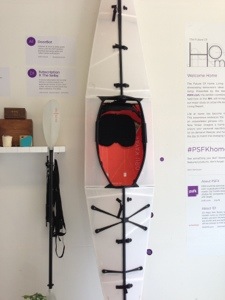
Oru Kayak folds up for the urban kayaker

From the hydroponic plant system in the window to the folding kayak and wireless/3D everything, the exhibit only disappoints in its focus on gadgets rather than the big-picture thinking for which PSFK is known. Their report on The Future of Work was revelatory. It showed how we will communicate, collaborate and innovate in the future. PSFK provided not only a blueprint for the the workspace of the future, but a clear road map for how we will get there.

I wanted the same depth and immersive thought applied to the hows and whys of home living in the future. What will be the transformative technologies and forces that redefine our living spaces? However, the Future of Home Living Experience is still a fascinating look at some incredible technology and services that will make our lives better, healthier and more balanced.

If you are interested you can sign up for the exhibit here. And please, let me know what you think.

Delete, Delete, Delete

Recently I passed on an iPhone 4 to my son. He’s 10 years old and he was absolutely dying for a phone. Like all my gadgets it was crammed with apps, pictures, music, videos and more.

Almost immediately he was out of memory. He wanted to have more space and i said you need to delete some apps. Watching him was a beautiful thing.

He went through his deck like a madman. Boring. Delete. Don’t want it. Delete. Why do I have this? Delete. I hate this game. Delete. Outgrown. Delete. Delete. Delete Delete.

20130703-234153.jpg

It was amazing. In just a few minutes he had effortlessly and ruthlessly deleted 2GB of apps. No sentiment. No wavering. Just business.

I painstakingly debate whether to trash apps and anything else that is overloading my phone. With hundreds of games, services, social networks and utilities all mostly losing the battle for my attention, why is it so easy to add more stuff and so hard to lose it?

)Yes, I downloaded an app while writing this, but I deleted one as well, so that’s something.)

It’s just stuff, but the emotional and intellectual attachment is strong. Do I need more memory or just the execution-style app killing skills of my son? Maybe I can implement his process to clean up my iPhone, my iPad and maybe a few junk drawers as well.

In these days of app, email, text, music, video and information overload and the push to unplug and unclutter we can learn a powerful lesson from a 10 year old.

Delete. Delete. Delete.

My home office this week!

20121102-115958.jpg

Most of my town is without power, phones or wifi. The amazing people along the few blocks that do have power provided free coffee, powerstrips and wifi. People are pretty amazing and I’ve had the opportunity to meet so many neighbors. A lot of wreckage, but a lot of positive action. Go Hoboken!

Turf – For the Foursquare Obsessive who has Everything

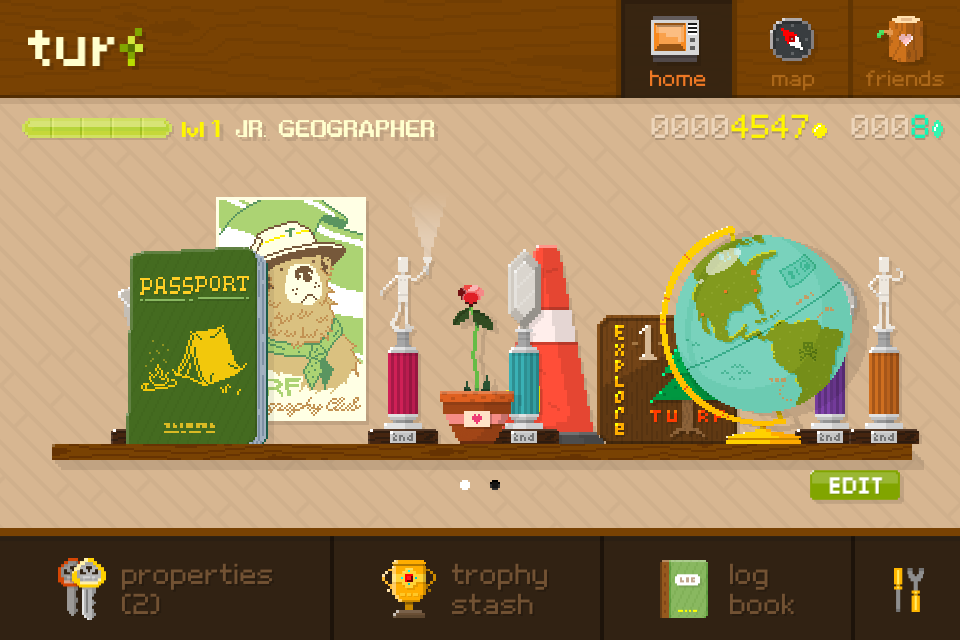
Turf start page

Some might say I am a little bit obsessive with Foursquare … and that might be true. Yes, I have checked in everywhere and anywhere for the past 2 1/2 years. Yes, I spent an entire weekend in 2010 on a quest for badges (extensive blog post coming someday). Right away I loved the game mechanics and the perfect combination of curation, discovery and random serendipity of the location based app. I want each update to give me better tools to find the best dish on the menu, locate the coffee shop with free wifi and help me discover the secrets of every new neighborhood.

I love checking out new Foursquare apps and hacks that add to that experience. A favorite new one that I’ve discovered is called Turf (or fully Turf Geography Club). It started as a Kickstarter project and now you can find the app in the Apple App Store (coming to Android soon). I first read about it on Mashable earlier this month where Turf founder Michael Tseng called it “real-world Monopoly.”

Basically you earn coins and crystals for checking in and spend your loot on acquiring locations. Once you own a property you not only collect rent, but must maintain the properties and can develop them to add to their value. Watch out, other stealthy players will try and spin the wheel to nab your prized properties. Of course, you win trophies as you gain experience and add to your virtual real estate portfolio. Also, it seems like the game offers plenty of opportunity for the developers to add to the experience and make Turf even better.

Initially the user interface and learning curve offer a bit of a challenge, but a little gameplay and trial-and-error will have you navigating the app like a pro. Right now they aren’t that many people playing and since Twitter has been blocking apps from helping you discover your friends, it’s hard to find your people. However, I know a couple of fellow obsessives who are playing so it has been very fun so far. While I love Foursquare apps that are baked into the core app, Turf is a standalone app, but it’s worth your time to open it up and play real estate mogul. And the retro Ranger Rick/Smokey the Bear graphics are pretty cool indeed.

So I am calling on all Foursquare obsessives to check out Turf. Download the app and start buying up your neighborhood. I would love to see you there!

In Praise of Fourstalgia

One of my favorite new additions to Foursquare is Fourstalgia. It’s a very cool hack project built by Jon Hoffman @hoffrocket, an engineer at Foursquare.

When you connect the app your check-ins surface local historical photos through SepiaTown, a crowd sourced database of historical photos.

What’s awesome about Fourstalgia is both how simple and immediately rewarding it is. You get additive content that is completely relevant and it is built right into your Foursquare experience. If you want to share the photos you can tweet right from the app.

The only thing on my wishlist is additional historical information that tells me more about the pictures. You get a short description, but I need to know everything about the Quartette Club Hall in Hoboken right now.

Try it out and let me know what you think.

20120810-213047.jpg

My Desperate Quest For Power

I burst into the coffee shop with two goals in mind. Power and coffee. Power, first, then coffee, then wi-fi if I am lucky. I scan the walls, peek under tables, look behind chairs. Other patrons eye me suspiciously. There it is! An outlet. I grab one of the two phone jacks always in my bag. Inserting one end into my phone, I plug the other into the outlet. A momentary pause, then the familiar buzz from my phone indicating that electricity is now surging into its depleted battery.

Give me 10 minutes and I feel a little more comfortable. 20 or 30 and I am close to full power. After an hour it is definitely 100%.

It’s amazing how a guy who didn’t even have a home phone in college could be so completely lost without his phone. And that phone requires power. When the the battery percentage drops to 80 it makes me nervous. 50% makes me down downright edgy. At 30% I’m in a panic. Must. Find. Power.

I spend most my days in the city going from meeting to meeting, appointment to appointment. Like most consultants, freelancers and/or job seekers. the one thing that I don’t always have is a place to charge my phone and laptop. Even more than wi-fi, my primary requirement is a free source of power. I know the coffee shops, restaurants and libraries that offer power, wi-fi and a clean place to sit.  I check Foursquare tips and keep a list of the best spots all around town. Throw in some good coffee and tasty snacks and you’ve got my dedicated business. I will come back again and again and schedule meetings there with friends and spend money because these are the places that offer a great customer experience.

If you are a consultant, freelancer or job seeker, what are some tips for getting your job done on the go?